JAQSI#
This page aims to provide a brief overview of the JAQSI (just another quantum simulator) embedded in our package.
The simulator aims to be fully abstracted by the Model class, so for most usecases, it should not be required to interact with the simulator directly.
However, some scenarios require building a custom circuits or require more granular control.
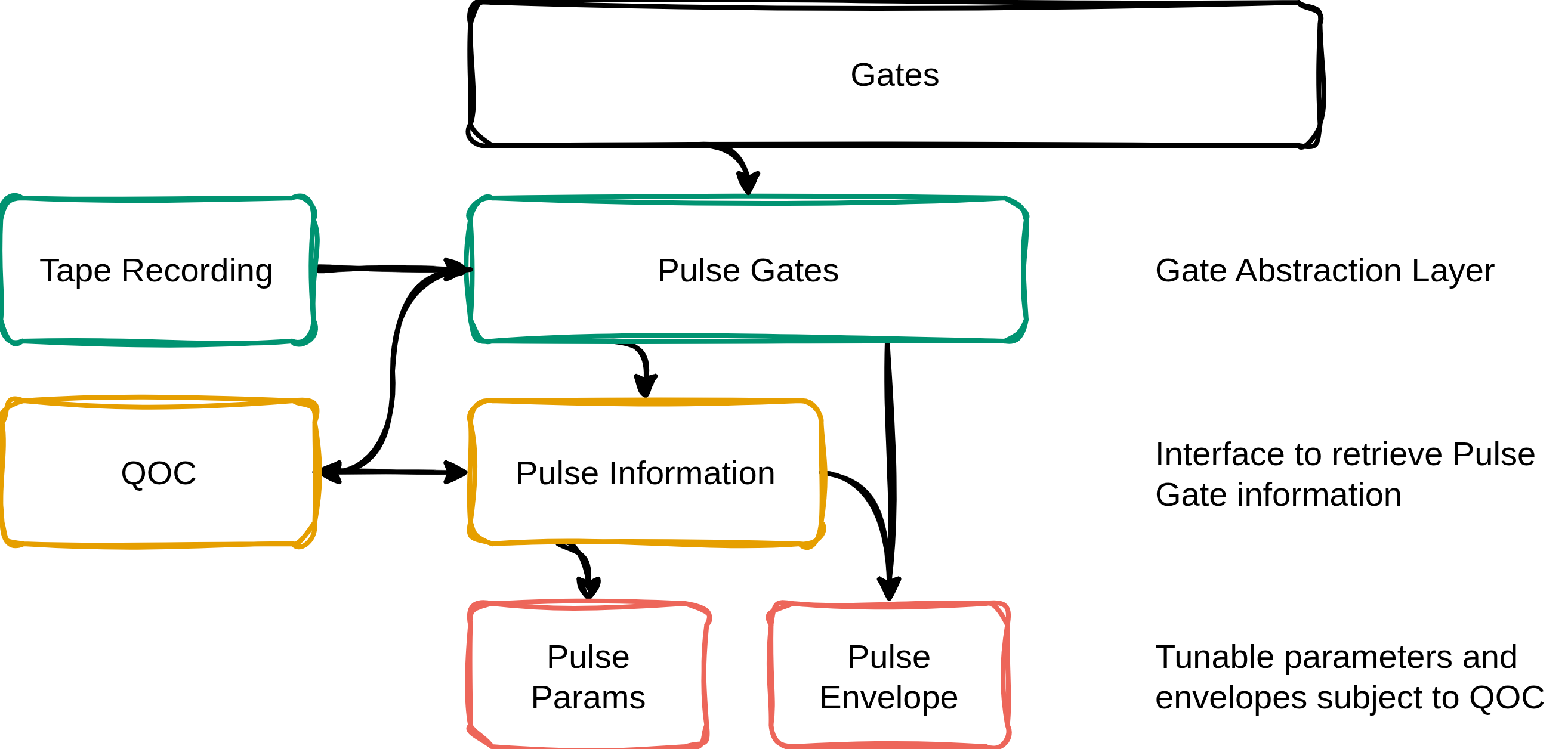
In the figure below, you can see how JAQSI provides the Foundation for the more standard interfaces Model, Ansaetze and Gates.
With the latter two being responsible of constructing quantum circuits and therefore interface direction with the Operations module of JAQSI, Model interfaces with the Script class, the main interface for circuit execution.
Generally, all operations are registered on a Tape when being created in the context of a Script (see examples below).
All matrix definitions (including Kraus channels for noisy simulation) are registered in the Operations module.


While the standard gate execution is quite straight-forward, the pulse simulation requires a bit more care.
Here we split up PulseGates (abstracted by the Gates class) into PulseParams and PulseEnvelope to get more fine grained control over the underlying implementation.
As a single source of truth for both, there is the PulseInformation class, providing valid combination of these two characteristics.
Architecture#
Internally, the simulator is split into a handful of modules, each with a single responsibility. Together they form a pipeline that turns a circuit function into a measurement result.
operations.py: the foundation. Defines every quantum operation: gates (H,RX,CX,Rot, ...), observables (PauliZ,Hermitian), Kraus noise channels (DepolarizingChannel,AmplitudeDamping, ...) and the (parametrized) Hamiltonians used for pulse evolution. EachOperationcarries its matrix definition and knows how to apply itself to a statevector or density matrix via cachedeinsumcontractions.tape.py: the recording layer. Holds the thread-localTapeonto which operations register themselves as they are created. Arecording()context manager collects the operations built inside a circuit function into an ordered list : nothing is executed yet.script.py: the orchestrator. TheScriptclass is the main entry point (and whatModelbuilds upon). It records the circuit, infers the number of qubits, decides between pure and density-matrix simulation, dispatches measurements, and takes care of JIT caching, automatic batching (vmapwith memory-aware chunking) and circuit drawing.simulation.py: the compute engine. A set of pure, stateless functions that run a recorded tape:simulate_pure(statevector),simulate_mixed(density matrix) and the measurement kernels (measure_state,measure_density,sample_shots). Being pure JAX functions, they are fully differentiable andjit/vmap-compatible.memory.py: memory accounting. Pure helpers that estimate the peak memory of a batched run and, when it would not fit in available RAM, split the batch into chunks that do (estimate_peak_bytes,compute_chunk_size,execute_chunked).Scriptcalls these to drive its memory-awarevmapchunking.evolution.py: Hamiltonian time-evolution. TheEvolutionclass builds gates that evolve a (parametrized) Hamiltonian in time, either analytically (exp(-i t H)for a staticH) or by solving the Schrödinger equation with an adaptivediffraxsolver or a fixed-step Magnus integrator. This module backs the pulse-level simulation.jaqsi.py: the entry-point module. ExposesScriptfor circuit building, theHamiltonianfactory for time-evolution sources, and a few pulse/gate-independent quantum-info helpers (partial_trace,marginalize_probs,build_parity_observable). Time evolution is invoked as a method on the Hamiltonian object (hamiltonian.evolve(...)); theEvolutionengine is re-exported here for solver configuration (Evolution.set_solver_defaults).
A call to Script.execute(...) then runs four stages:
- Record : the circuit function is executed once so that each operation registers itself on a fresh
Tape. - Prepare : the qubit count is inferred and the presence of noise channels decides between statevector and density-matrix simulation.
- Simulate : the operations are applied in order, each gate contracted into the state via
einsum. - Measure : the resulting state is turned into the requested output (
state,probs,expvalordensity) and optionally sampled into shots.
As the whole pipeline is built on JAX, any execution can be differentiated, JIT-compiled and vectorized.
Usage#
The API of our simulator is very similar to what one might be used to know from pennylane.
Gate Level#
For a basic circuit execution, we have to do two imports:
Next, we can create a circuit and specify the observable:
Finally, creating a Script and excute it will give us the probabilities for this standard Bell-Circuit:
Parameterization of circuits is straightforward; you just have to pass the args to the execute function:
import jax.numpy as jnp

n_qubits = 1

def circuit(phi, theta, omega):
    op.Rot(phi, theta, omega, wires=0)
    op.Rot(jnp.pi, 1/2*jnp.pi, 1/4*jnp.pi, wires=0)

obs = [op.PauliZ(wires=i) for i in range(n_qubits)]
jss = js.Script(circuit)
jss.execute(type="expval", obs=obs, args=(jnp.pi, 1/2*jnp.pi, 1/4*jnp.pi))
Training those circuits is a breeze as we entirely build upon JAX and can just use OPTAX for this purpose:
import optax as otx

def cost_fct(params):
    phi, theta, omega = params
    return jss.execute(type="expval", obs=[op.PauliZ(0)], args=(phi, theta, omega))[0]

params = jax.numpy.array([0.1, 0.2, 0.3])
opt = otx.adam(0.01)
opt_state = opt.init(params)

for epoch in range(1, 101):
    grads = jax.grad(cost_fct)(params)
    updates, opt_state = opt.update(grads, opt_state, params)
    params = otx.apply_updates(params, updates)

    if epoch % 10 == 0:
        print(f"Epoch: {epoch}, Cost: {cost_fct(params):.4f}")
Beyond this, you can conveniently call .dagger() or .power() on operations, ...
def circuit():
        op.RX(0.5, wires=0)
        op.RX(0.5, wires=0).dagger()
        op.PauliX(wires=0).power(2)

obs = [op.PauliZ(0)]
jss = js.Script(circuit)
res = jss.execute(type="expval", obs=obs)

print(res) # we expect to end up in |0⟩ again
or combine them with different noise channels:
def circuit():
    op.H(wires=0)
    op.CX(wires=[0, 1])
    op.DepolarizingChannel(0.1, wires=0)
    op.DepolarizingChannel(0.1, wires=1)

jss = js.Script(circuit)
rho = jss.execute(type="density")
purity = jnp.real(jnp.trace(rho @ rho))
print(purity) # Purity should be < 1
Pulse Level#
This section is focussing on the Pulse-level related interface of the simulator.
If you want to work with the higher-level Model interface instead, head over to the pulses documentation.
As Pulse Gates are built entirely upon JAQSI operations, you can also use those in the circuit to perform pulse level simulation:
from qml_essentials.gates import PulseGates

def circuit(w):
    PulseGates.RX(w, wires=0)

obs = [op.PauliZ(0)]
jss = js.Script(circuit)
res = jss.execute(type="expval", obs=obs, args=(jnp.pi*0.5,))
print(res) # expect sth. around 0 (but not too close)
Mixing pulse level simulation with noisy simulations is possible as well:
def circuit(w):
    PulseGates.RX(w, wires=0)
    PulseGates.RY(w, wires=0)
    PulseGates.CX(wires=[0, 1])
    op.DepolarizingChannel(0.1, wires=0)
    op.DepolarizingChannel(0.1, wires=1)

jss = js.Script(circuit)
res = jss.execute(type="density", args=(jnp.pi*0.5,))
purity = jnp.real(jnp.trace(rho @ rho))
print(purity) # Purity should be < 1
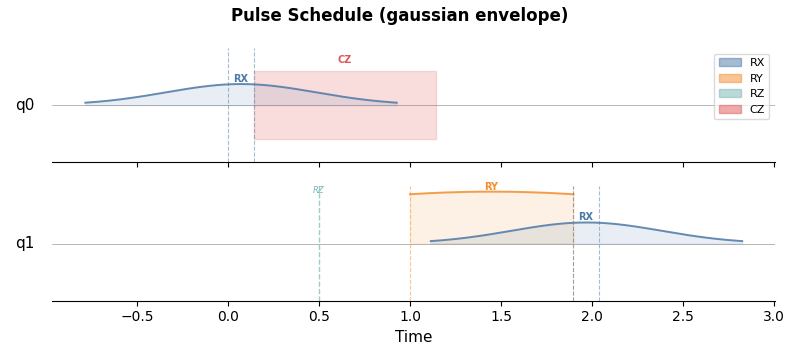
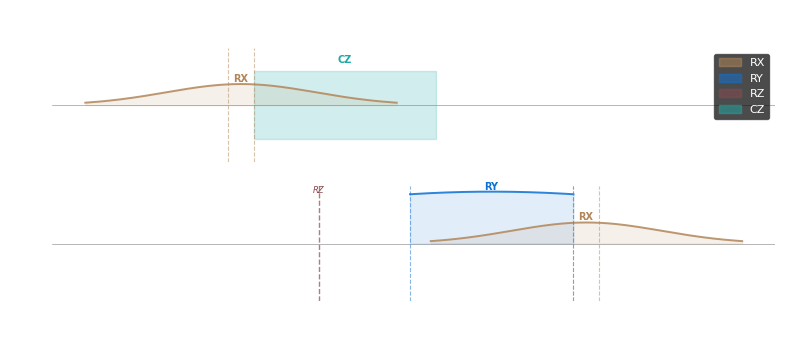
You can visualize the pulses schedules, i.e. the sequence in which the pulses are applied on each qubit in the circuit, using the draw method.
Here, shaded areas represent the pulse shape/envelope (e.g. "Gaussian") of the pulse and the vertical line represents the time at which the pulse is applied.
Note that all gates are automatically decomposed into basis gates (e.g. H is decomposed into RZ and RY).
def circuit(w):
    PulseGates.RX(w, wires=0)
    PulseGates.CZ(wires=0)
    PulseGates.H(wires=1)
    PulseGates.H(wires=1)

jss = js.Script(circuit)

fig, axes = jss.draw(figure="pulse", args=(jnp.pi*0.5,))
Now let's get a level deeper into the pulse interface. Under the hood what happens when you run a pulse gate, is that you evolve a Hermitian matrix in time. To demonstrate this, we build a very simple circuit:
def evol_circuit(t):
    time_evol = op.Hermitian(matrix=op.PauliZ._matrix, wires=0).evolve()
    time_evol(t=t, wires=0)
We can use this circuit directly in JAQSI by passing it to the Script class we've seen above:
Here, we let the circuit evolve for t=0.3 and measure the qubit in the X basis.
Obviously this isn't particluarly usefull, because it doesn't change the state of the qubit.
However, we can extend this circuit a little bit to start in the |+⟩ state instead:
def evol_circuit(t):
    H(wires=0)  # prepare |+⟩
    time_evol = op.Hermitian(matrix=op.PauliZ._matrix, wires=0).evolve()
    time_evol(t=t, wires=0)
Note, how we combine a "standard" gate here and combine it with a Hermitian evolution. We can then measure:
t = 0.3
jss = js.Script(f=evol_circuit)
res = jss.execute(type="expval", obs=[PauliX(0)], args=(t,))
which gives us exactly jnp.cos(2 * t).
We've just seen an example for a static Hermitian evolution. Naturally we can extend this to a parameterized Hermitian as well:
def coeff(p, t):
    return p

def circuit(p,t):
    H(wires=0)  # prepare |+⟩
    ph = coeff * Hermitian(matrix=Z, wires=0, record=False)
    ph.evolve()([p], t)
Note here, that coeff is a callable.
While it seems a little bit strange to first use a callable and the parameterize it directly afterwards, this mechanism allows us to pre-compile the operation.
Naturally, we can now use this parameter in a training-scenario and leverage the performance advantage we got through the pre-compilation.